How to Write a YouTube Script with AI Without Writing a Word
A good script is the foundation of every successful YouTube video. It determines the pacing, the story, and whether viewers stick around until the end. Here is how to get one without writing a word yourself — and how to steer it.
Why the script matters more than anything else
Most new creators focus on equipment, thumbnails, or editing style. But the single biggest factor in whether a video succeeds is the script. A strong script with a clear hook, tight pacing, and a satisfying ending will outperform a beautifully filmed video with a weak one every time.
The problem is that writing takes time — and most people find staring at a blank page painful. AI removes that friction. You describe what you want, and it gives you a starting point you can refine in minutes.
One topic, one plan
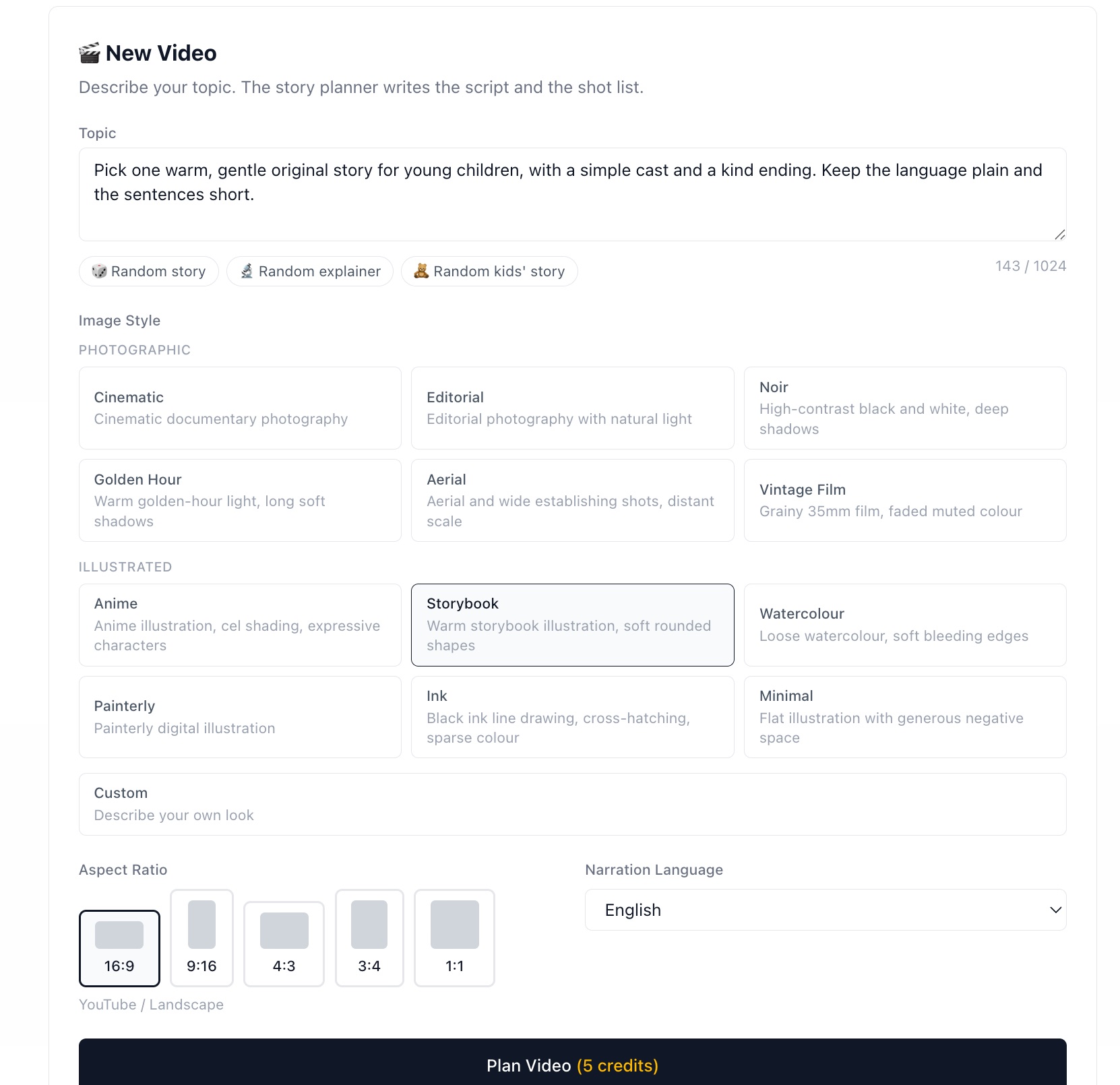
Everything the planner needs fits on one screen.
There is no separate "write the script" step. You describe a topic (up to 1,024 characters), pick a look and a narration language, and one AI pass writes the whole plan: the spoken script, the shot list that carries it, and the title, description and hashtags you will publish with.
The script is not written as an essay and then chopped up. It is written as a sequence of shots from the start — each shot is one image plus the exact line spoken over it. That is why the narration reads like speech rather than prose: it was never meant to be read silently.
Write a topic the planner can work with
The more specific your topic, the better the story. "The Roman Empire" is too broad. "Why Roman soldiers were the most effective military force for 500 years" gives the planner something to build a narrative on.
Example topics that work well:
- ›"The real reason the Roman Empire fell — and what historians got wrong"
- ›"How compound interest works and why most people never use it"
- ›"The psychology behind why horror movies are so addictive"
If you would rather not think of one, the three buttons under the box — random story, random explainer, random kids' story — fill in a starting point and preselect a style that suits it.
Why there is no length setting
You will notice there is no "3 minutes" dropdown and no shot-count field. That is deliberate. A number fixed in advance forces the writer into one of two bad outcomes: padding the story with filler shots to reach it, or cutting the story short to stay under it.
Instead the planner decides how many shots the topic actually needs, and each shot lasts exactly as long as its own narration take. A simple idea gets a short video; one that needs room gets a longer one. The length is a result of the story, not a constraint on it.
Pick a look, not a paragraph
The style presets are grouped into Photographic and Illustrated — cinematic, editorial, noir, golden hour, aerial, vintage film, anime, storybook, watercolour, painterly, ink and minimal. Whichever you choose is held across every shot in the video, so the visuals look like one piece rather than twelve unrelated images.
If none of them fit, the Custom box takes your own description. Keep it short and concrete: an image model follows a handful of decisive words far better than a paragraph of adjectives.
What to do after your script is generated
The AI output is a first draft, not a final script. Spend 5–10 minutes on these checks before moving on:
Read it aloud
AI scripts sometimes have sentences that look fine on screen but feel awkward when spoken. Reading aloud catches these immediately.
Sharpen the opening line
The first 2 sentences determine whether someone keeps watching. If they don't immediately create curiosity, tension, or surprise — rewrite them.
Cut anything that slows the pace
YouTube viewers have short attention spans. If a paragraph doesn't move the story forward, delete it.
Check the ending
A weak ending kills watch time. The script should close with a satisfying conclusion or a clear next step for the viewer.
Script length guide
You do not set a length in the planner — the story decides it. But it helps to know roughly where a topic will land, because that is what determines the cost and how the video fits each platform.
| Video Length | Approx. Word Count | Best For |
|---|---|---|
| 1–2 min | 150–300 words | TikTok / Shorts / Reels |
| 3–5 min | 450–750 words | YouTube mid-length, good for monetization |
| 8–12 min | 1,200–1,800 words | In-depth explainers, higher ad revenue |
| 15–20 min | 2,250–3,000 words | Documentary-style, authority content |
Write your first AI script — free
50 free credits at signup. Describe a topic and have a script and shot list ready in under 2 minutes.
Start for Free