How to Keep the Same Character in Every AI Video Clip
Why AI video characters change from shot to shot, and the two things that keep them the same: a storyboard drawn first, and reference photos. With practical tips for faces, outfits and ageing.
You generate a great first clip. The heroine has auburn hair, green eyes and a grey dress with a white collar. You generate the second clip, and she is somebody else. This is the most common complaint about AI video, and it has a cause you can work around.
Why characters change between clips
A video model has no memory. Each clip is generated on its own, from the words of its prompt and whatever images it is given. “A young woman with auburn hair” describes millions of faces, so every clip picks a different one. Even the same prompt run twice gives two different people.
So consistency cannot come from the model remembering. It has to come from what you hand it every single time: the same pictures and the same words.
Fix 1: draw the characters once, then film from the drawing
For a story, the agent first draws a storyboard: nine key frames painted together as one picture. Because all nine are drawn at once, the characters in them match each other. Then every clip is generated with its storyboard panels as reference images, so the model starts from the same drawn face every time instead of inventing one.
Here is the heroine of a one-minute adaptation of “The Necklace” in three panels of the same sheet: at home, at the ball, and ten years later.
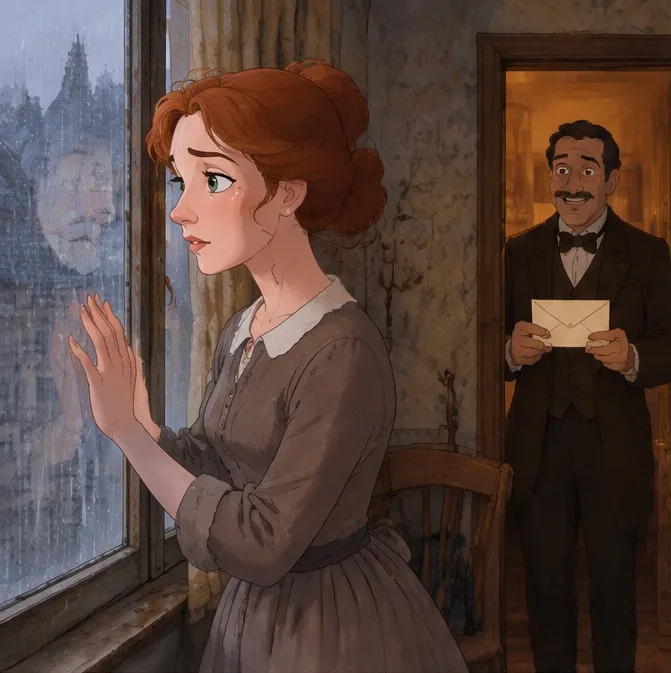
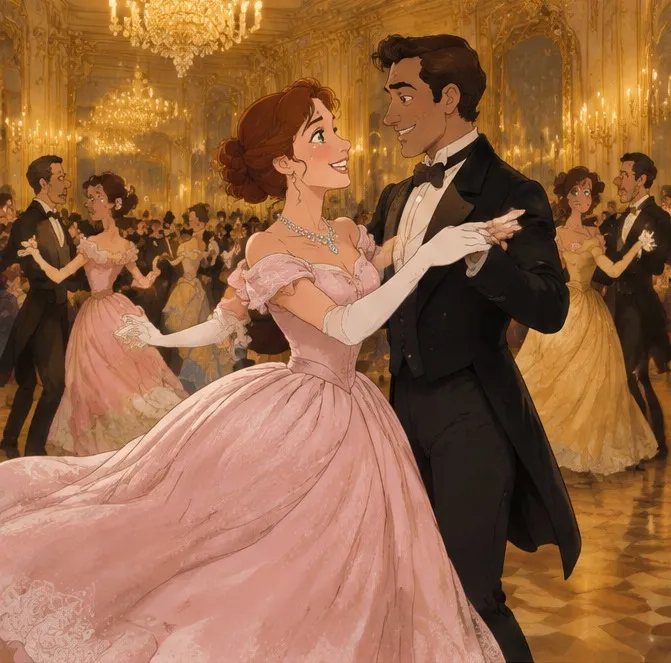
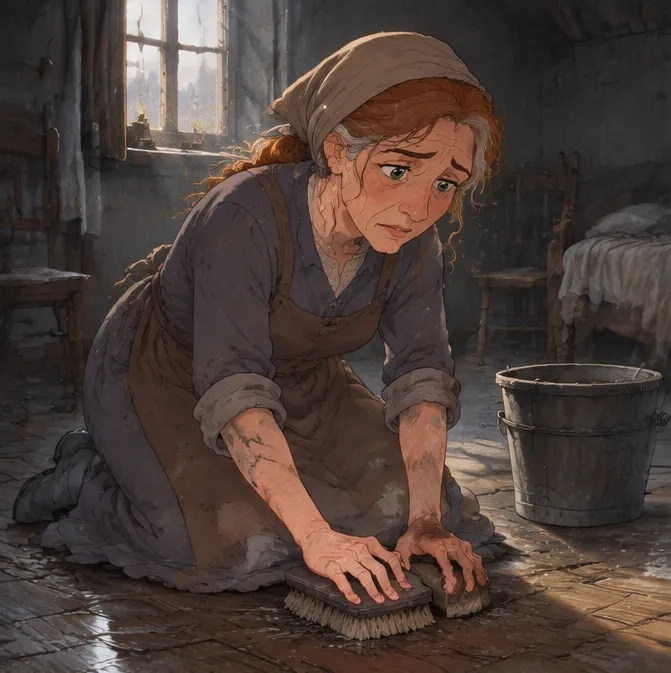
Different clothes, different light, a decade of hardship, and still recognisably the same woman. That is the storyboard doing its job.
Fix 2: describe each character the same way, every time
Pictures carry the face; words carry everything the picture might leave ambiguous. The agent writes one fixed description for each character and repeats it, word for word, in every prompt, never a shortened version in one clip and a different phrasing in the next. A good character description has:
- Age and build: “a slender woman of about 25”.
- Two or three features that are easy to see at a distance: “auburn hair in a loose chignon, large green eyes”.
- The outfit, specifically: “a faded grey-brown cotton dress with a white collar”, not “a plain dress”.
When you write your own story request, you can give these details yourself. If you do not, the agent proposes them in its plan, and you can change them before anything is drawn.
Fix 3: use a photo of the real person or thing
If the character already exists (you, a mascot, a product, a character from your earlier videos), attach its picture. Up to six reference photos can go into one clip, and the prompt names each one (“the woman in @Image 1”, “the bottle in @Image 2”), so the model knows which picture is which. The clip keeps the face or the object as it is in your photo.
Tips for the tricky cases
Changing outfits
State the change and when it happens: “in the ball scene only, she wears a pale pink off-shoulder gown with long white gloves.” A costume change that is not written down looks like a different character.
Ageing a character
Keep the face and change only what time changes: “the same face and green eyes, about ten years older, grey streaks in the auburn hair, rough red hands.” Writing a whole new description creates a new person.
Two characters who look alike
Give them contrasting features (black hair and auburn hair, emerald and grey) so the model cannot merge them. The agent also tells the model that no two characters share the same appearance and no one appears twice in a frame.
Long stories
A story longer than one sheet gets more storyboard sheets. Each new sheet repeats the same written character descriptions, so the cast carries over from sheet to sheet.
What to check before you approve a clip
Every clip is shown to you as a card before it is generated. Look at three things:
- The reference images are the right panels or photos, in the right order.
- Each character in the prompt is tied to an image (“Mathilde @Image 1”).
- The description matches the one in the plan, outfit included.
If something is off, press “Change something” and say what. It is far cheaper to fix a prompt than a finished clip.